
Shelly Pill
The Pill by Shelly (S3SN-0U53X) is a compact multi-purpose low-voltage Wi-Fi & Bluetooth sensor hub powered by 5V via USB-C. It features 3 configurable GPIO pins exposed through a Micro-USB output connector, supporting DS18B20 temperature probes, DHT22 sensors, analog voltage measurement (0-2.5V built-in, 0-30V with add-on), digital I/O, and I2C peripherals. It measures just 26 x 20 x 8.5 mm and weighs 3 grams.
The device uses an ESP32-C3 (ESP-Shelly-C38F) with 8 MB embedded flash. The top USB-C connector provides power and native USB-SERIAL-JTAG for flashing.
The bottom Micro-USB connector is NOT a USB data port it is repurposed as a compact 5-pin GPIO connector for sensor and actuator connections.
GPIO Pinout
| Pin | GPIO | Function | Notes |
|---|---|---|---|
| Micro-USB-1 | — | 5V Power Out | Powers external sensors |
| Micro-USB-2 | GPIO4 | pin0 — Primary I/O | ADC1_CH4, 1-Wire, DHT22, Analog, I2C |
| Micro-USB-3 | GPIO3 | pin1 — Secondary I/O | ADC1_CH3, Digital I/O, Analog, I2C |
| Micro-USB-4 | GPIO6 | pin2 — Secondary I/O | Digital I/O only (no ADC) |
| Micro-USB-5 | — | GND | |
| Button | GPIO10 | Reset button (back of PCB) | Hold >10s for factory reset |
| LED | GPIO8 | Status LED | Active-low |
| USB-C | GPIO18/19 | USB Serial/JTAG | For flashing and debug console |
The Micro-USB pin numbering follows the standard connector pinout (VBUS, D-, D+, ID, GND).
Compatible Add-ons
Shelly offers plug-in accessories that connect via the Micro-USB sensor port. All are compatible with ESPHome using the GPIO mapping above.
- 5-Terminal Add-on — Exposes all 3 GPIOs + 5V + GND on screw terminals. Ideal for custom wiring, I2C sensors, and UART devices.
- SSR Add-on — Dual-channel solid-state relay (30V/300mA). LOAD1 and LOAD2 are driven internally via IO1 + IO2, IO3 (GPIO6) remains free as digital I/O.
- Analog 0-30V Add-on — Voltage divider on IO1 (GPIO4), use
multiply: 12.0filter in ESPHome. - DS18B20 3.5mm cable — Temperature probe via 1-Wire on IO1 (GPIO4), included in box.
- Splitter 1-to-5 — Connects up to 5x DS18B20 sensors on the same 1-Wire bus.
5-Terminal Add-on to Micro-USB Mapping
| Terminal | Micro-USB Pin | GPIO | Capabilities |
|---|---|---|---|
| 5V | Pin 1 (VBUS) | — | 5V power output for sensors |
| IO1 | Pin 2 (D-) | GPIO4 | DS18B20, DHT22, ADC (0-2.5V), Digital I/O, I2C |
| IO2 | Pin 3 (D+) | GPIO3 | ADC, Digital I/O, I2C |
| IO3 | Pin 4 (ID) | GPIO6 | Digital I/O only (no ADC) |
| GND | Pin 5 (GND) | — | Ground reference |
With the 5-Terminal Add-on or a custom Micro-USB breakout, you can also attach I2C sensors (e.g. BME280, BH1750) using IO1/GPIO4 (SDA) + IO2/GPIO3 (SCL), or UART devices using any two of the three I/O terminals.
Flashing
This device can be flashed directly over the top USB-C connector using the ESP32-C3’s native USB-SERIAL-JTAG interface. No external UART adapter or soldering is needed.
- Connect the USB-C cable to your computer.
- Open https://web.esphome.io/ and click Connect.
- Select the serial port and flash your firmware.
After initial flash, OTA updates work over Wi-Fi.
Serial Programming Header
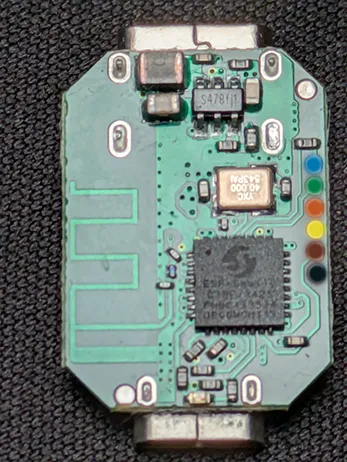
The test pads on the right edge of the PCB (visible in the top photo) provide a serial UART interface as an alternative programming method:
| Colour | Signal |
|---|---|
| Blue | U0TXD |
| Green | U0RXD |
| Orange | 3V3 |
| Yellow | BOOT |
| Brown | CHIP_EN |
| Black | GND |
Warning: The bottom Micro-USB connector outputs 5V and 3.3V GPIO signals. Do NOT connect it to a computer or USB charger.
Basic Configuration — DS18B20 + Digital Outputs
substitutions:  device_name: shelly-pill  friendly_name: "Shelly Pill"
esphome:  name: ${device_name}  friendly_name: ${friendly_name}  platformio_options:    board_build.flash_mode: dio    board_build.flash_size: 8MB
esp32:  board: esp32-c3-devkitm-1  flash_size: 8MB  framework:    type: esp-idf
logger:  hardware_uart: USB_SERIAL_JTAG
wifi:  ssid: !secret wifi_ssid  password: !secret wifi_password  ap:    ssid: "${friendly_name} Fallback"
captive_portal:
api:  encryption:    key: !secret api_key
ota:  - platform: esphome    password: !secret ota_password
# DS18B20 on pin0 (GPIO4)one_wire:  - platform: gpio    pin: GPIO4
sensor:  # Discovery: Run once without address to find sensor addresses in log  - platform: dallas_temp    name: "Temperature"    update_interval: 30s
  - platform: wifi_signal    name: "WiFi Signal"    update_interval: 60s
  - platform: uptime    name: "Uptime"    update_interval: 60s
# Digital outputs on pin1 (GPIO3) + pin2 (GPIO6)switch:  - platform: gpio    pin: GPIO3    name: "Output 1"    id: output_1    restore_mode: RESTORE_DEFAULT_OFF
  - platform: gpio    pin: GPIO6    name: "Output 2"    id: output_2    restore_mode: RESTORE_DEFAULT_OFF
# Boot/reset buttonbinary_sensor:  - platform: gpio    pin:      number: GPIO10      mode: INPUT_PULLUP      inverted: true    name: "Button"
# Status LEDstatus_led:  pin:    number: GPIO8    inverted: true
text_sensor:  - platform: wifi_info    ip_address:      name: "IP Address"
Alternative: DHT22 + Digital Inputs
# Replace the one_wire + dallas_temp sections with:
sensor:  - platform: dht    model: DHT22    pin: GPIO4    temperature:      name: "Temperature"    humidity:      name: "Humidity"    update_interval: 30s
# Replace the switch section with:
binary_sensor:  - platform: gpio    pin:      number: GPIO3      mode: INPUT_PULLUP      inverted: true    name: "Door Sensor"    device_class: door    filters:      - delayed_on_off: 50ms
  - platform: gpio    pin:      number: GPIO6      mode: INPUT_PULLUP      inverted: true    name: "Motion Sensor"    device_class: motion
Alternative: Voltmeter + BLE Proxy
# ADC Voltmeter on pin0 (GPIO4 = ADC1_CH4)sensor:  - platform: adc    pin: GPIO4    name: "Voltage"    attenuation: 11db    update_interval: 10s    accuracy_decimals: 2    unit_of_measurement: "V"    # For 0-30V Add-on (12:1 voltage divider), uncomment:    # filters:    #   - multiply: 12.0
# BLE Proxy for Home Assistantesp32_ble_tracker:  scan_parameters:    active: true
bluetooth_proxy:  active: true
Alternative: I2C Sensor (BME280)
Requires the 5-Terminal Add-on or a custom Micro-USB breakout cable.
# I2C on pin0 (SDA) + pin1 (SCL), pin2 free for digital I/Oi2c:  sda: GPIO4  scl: GPIO3
sensor:  - platform: bme280_i2c    address: 0x76    temperature:      name: "Temperature"    humidity:      name: "Humidity"    pressure:      name: "Pressure"    update_interval: 30s