
Shelly 1
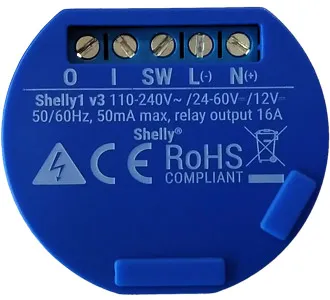
GPIO Pinout
| Pin | Function |
|---|---|
| GPIO4 | Relay |
| GPIO5 | Switch Input |
Basic Configuration
# Basic Configesphome:  name: shelly_1
esp8266:  board: esp01_1m
wifi:  ssid: !secret wifi_ssid  password: !secret wifi_password
logger:api:ota:
# Device Specific Configoutput:  - platform: gpio    pin: GPIO4    id: shelly_1_relay
light:  - platform: binary    name: "Shelly 1 Light"    output: shelly_1_relay    id: lightid
binary_sensor:  - platform: gpio    pin:      number: GPIO5      #mode: INPUT_PULLUP      #inverted: True    name: "Switch Shelly 1"    on_state:      then:        - light.toggle: lightid    internal: true    id: switchid
Detached switch mode for push button light switch
This config will send events to Home Assistant so you can use the Shelly as detached switch. The events can be used as triggers for automations to toggle an attached (smart) light, and to perform other actions on double click and long click (e.g. turn off all the lights on the floor, start a “go to bed” automation).
In case there is no connection to Wifi, or no API connection (normally Home Assistant) the config will toggle the relay, so it will still toggle the attached light in cases where Wifi or HA fails.
The relay is exposed to Home Assistant as a switch. As well as some (optional) sensors with information on the ESPHome version and Wifi status
# Basic config
substitutions:  device_name: Shelly1
esphome:  name: shelly_detached
esp8266:  board: esp01_1m
wifi:  ssid: !secret wifi_ssid  password: !secret wifi_password
  # Enable fallback hotspot (captive portal) in case wifi connection fails  ap:    ssid: ${device_name} Hotspot    password: !secret hotspot_pass
captive_portal:
# Enable logginglogger:
# Enable Home Assistant APIapi:
# Enable OTA updatesota:
# Enable Web server (optional).web_server:  port: 80
# Text sensors with general information.text_sensor:  # Expose ESPHome version as sensor.  - platform: version    name: ${device_name} ESPHome Version  # Expose WiFi information as sensors.  - platform: wifi_info    ip_address:      name: ${device_name} IP    ssid:      name: ${device_name} SSID    bssid:      name: ${device_name} BSSID
# Sensors with general information.sensor:  # Uptime sensor.  - platform: uptime    name: ${device_name} Uptime
  # WiFi Signal sensor.  - platform: wifi_signal    name: ${device_name} WiFi Signal    update_interval: 60s
# Shelly 1 detached switch config with multi click options and fallback in case of wifi or api fail
switch:  - platform: gpio    name: shelly1 ${device_name}    pin: GPIO4    id: shelly_relay    restore_mode: restore_default_off
binary_sensor:  - platform: gpio    pin:      number: GPIO5    name: ${device_name} button    # config for multi click actions    on_multi_click:      # double click      - timing:          - ON for at most 1s          - OFF for at most 1s          - ON for at most 1s          - OFF for at least 0.2s        then:          - if:              condition:                and:                  - wifi.connected:                  - api.connected:              # send double click event in case wifi and api are conncected              then:                - homeassistant.event:                    event: esphome.button_pressed                    data:                      title: shelly ${device_name} double click              # toggle relay in case either wifi or api are not connected              else:                - switch.toggle: shelly_relay        # long click      - timing:          - ON for at least 1.5s        then:          - if:              condition:                and:                  - wifi.connected:                  - api.connected:              # send long click event in case wifi and api are conncected              then:                - homeassistant.event:                    event: esphome.button_pressed                    data:                      title: shelly ${device_name} long click              # toggle relay in case either wifi or api are not connected              else:                - switch.toggle: shelly_relay        # single click      - timing:          - ON for at most 1s          - OFF for at least 0.5s        then:          - if:              condition:                and:                  - wifi.connected:                  - api.connected:              # send single click event in case wifi and api are conncected              then:                - homeassistant.event:                    event: esphome.button_pressed                    data:                      title: shelly ${device_name} short click              # toggle relay in case either wifi or api are not connected              else:                - switch.toggle: shelly_relay    internal: true    id: button
Detached switch mode for toggle light switch
This config will send events to Home Assistant so you can use the Shelly as detached switch. The events can be used as triggers for automations to toggle an attached smart light.
In case the relay is switched off, the Shelly has no connection to Wifi, or no API connection to Home Assistant can be made, the config will toggle the relay. This allows the switch to still keep turning the attached smart light on and off when WiFi or Home Assistant is unavailable.
When the power drops and goes back on, the relay will default to off. This prevents lights turning on when a short power outage happens when you are away from home.
The relay is exposed to Home Assistant as a switch. As well as some (optional) sensors with information on the ESPHome version and Wifi status
substitutions:  device_name: "Switch Light Kitchen"
esphome:  name: shelly1-kitchen
esp8266:  board: esp01_1m
wifi:  ssid: !secret wifi_ssid  password: !secret wifi_password
  # Enable fallback hotspot (captive portal) in case wifi connection fails  ap:    ssid: "shelly1 kitchen hotspot"    password: !secret hotspot_pass
captive_portal:
# Enable logginglogger:
# Enable Home Assistant APIapi:
# Enable OTA updatesota:
# Enable Web server (optional).web_server:  port: 80
# Text sensors with general information.text_sensor:  - platform: wifi_info    ip_address:      name: ${device_name} IP
# Sensors with general information.sensor:  # Uptime sensor.  - platform: uptime    name: ${device_name} Uptime
  # WiFi Signal sensor.  - platform: wifi_signal    name: ${device_name} WiFi Signal    update_interval: 60s
# Shelly 1 detached switch config with fallback in case of wifi or api fail
switch:  - platform: gpio    name: ${device_name}    pin: GPIO4    id: shelly_relay    # after reboot, keep the relay off. this prevents light turning on after a power outage    restore_mode: ALWAYS_OFF
binary_sensor:  - platform: gpio    name: ${device_name} Input    pin:      number: GPIO5    # small delay to prevent debouncing    filters:      - delayed_on_off: 50ms    # config for state change of input button    on_state:      then:        - if:            condition:              and:                - wifi.connected:                - api.connected:                - switch.is_on: shelly_relay            # toggle smart light if wifi and api are connected and relay is on            then:              - homeassistant.service:                  service: light.toggle                  data:                    entity_id: light.kitchen            # else, toggle relay            else:              - switch.toggle: shelly_relay    id: button
Example as a Garage Door opener (via Dry Contact)
substitutions:  friendly_name: GarageDoor
esphome:  name: garageesp8266:  board: esp01_1m
# The door contact sensor that is attached to SW on the# Shelly 1. Not exposed to HA, instead used to set the# state of the cover.binary_sensor:  - platform: gpio    pin: GPIO5    name: "Garage Door Sensor"    device_class: door    icon: mdi:garage    id: contact_sensor    filters:#      - invert:      # Debounce the contact sensor to prevent rapid on/off/on events      - delayed_on_off: 500ms
# The relay in the Shelly 1 that will deliver the pulse to# the garage door opener (not exposed to HA)switch:  - platform: gpio    pin: GPIO4    name: "Garage Door Relay"    id: relay    internal: true
# This creates the actual garage door in HA. The state is based# on the contact sensor. Opening/closing the garage door simply# turns the relay on/off with a 0.5s delay in between.cover:  - platform: template    device_class: garage    name: "Garage Door"    id: template_cov    lambda: |-      if (id(contact_sensor).state) {        return COVER_OPEN;      } else {        return COVER_CLOSED;      }    open_action:      - switch.turn_on: relay      - delay: 0.5s      - switch.turn_off: relay    close_action:      - switch.turn_on: relay      - delay: 0.5s      - switch.turn_off: relay    stop_action:      - switch.turn_on: relay      - delay: 0.5s      - switch.turn_off: relay

wifi:  ssid: !secret wifi_ssid  password: !secret wifi_password  # domain: <replace with your domain if desired>  min_auth_mode: WPA2
  # Enable fallback hotspot (captive portal) in case wifi connection fails  ap:    ssid: $friendly_name Fallback Hotspot    password: !secret fallback_wifi_password
captive_portal:
# Enable logginglogger:
# Enable Home Assistant APIapi:  encryption:    key: !secret garage_door_encryption_key
ota:  - platform: esphome    id: my_ota    password: !secret ota_password
# Send IP Address to HAtext_sensor:  - platform: wifi_info    ip_address:      name: $friendly_name IP Address    ssid:      name: $friendly_name Connected SSID    bssid:      name: $friendly_name Connected BSSID    mac_address:      name: $friendly_name Mac Wifi Address    scan_results:      name: $friendly_name Latest Scan Results    dns_address:      name: $friendly_name DNS Address    power_save_mode:      name: $friendly_name Wifi Power Save Mode# Send WiFi signal strength & uptime to HAsensor:  - platform: wifi_signal    name: $friendly_name WiFi Strength    update_interval: 60s  - platform: uptime    name: $friendly_name "Uptime"