
HomeMate 4 Gang Touch Switch
Device Info
- Name: HomeMate 4 Gang Touch Switch
- Chip: CB3S
- MCU: BK7231N
Flashing with Serial
-
Open the device by removing the back cover. Remember the orientation of the PCB stack for reassembly.
-
Remove the PCB from the front panel. This is held by clips, so gently spread the panel sides to release the PCB Stack.
-
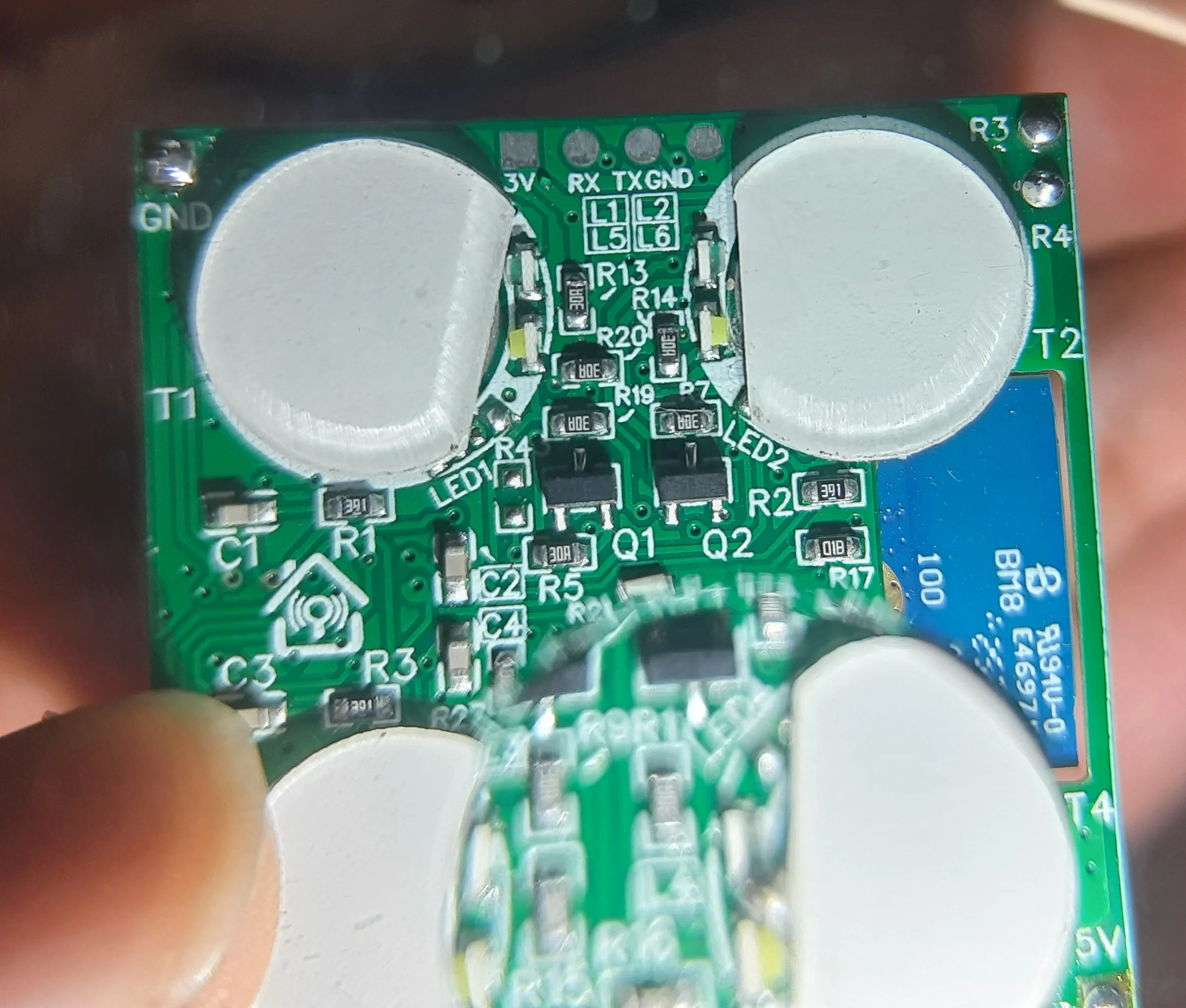
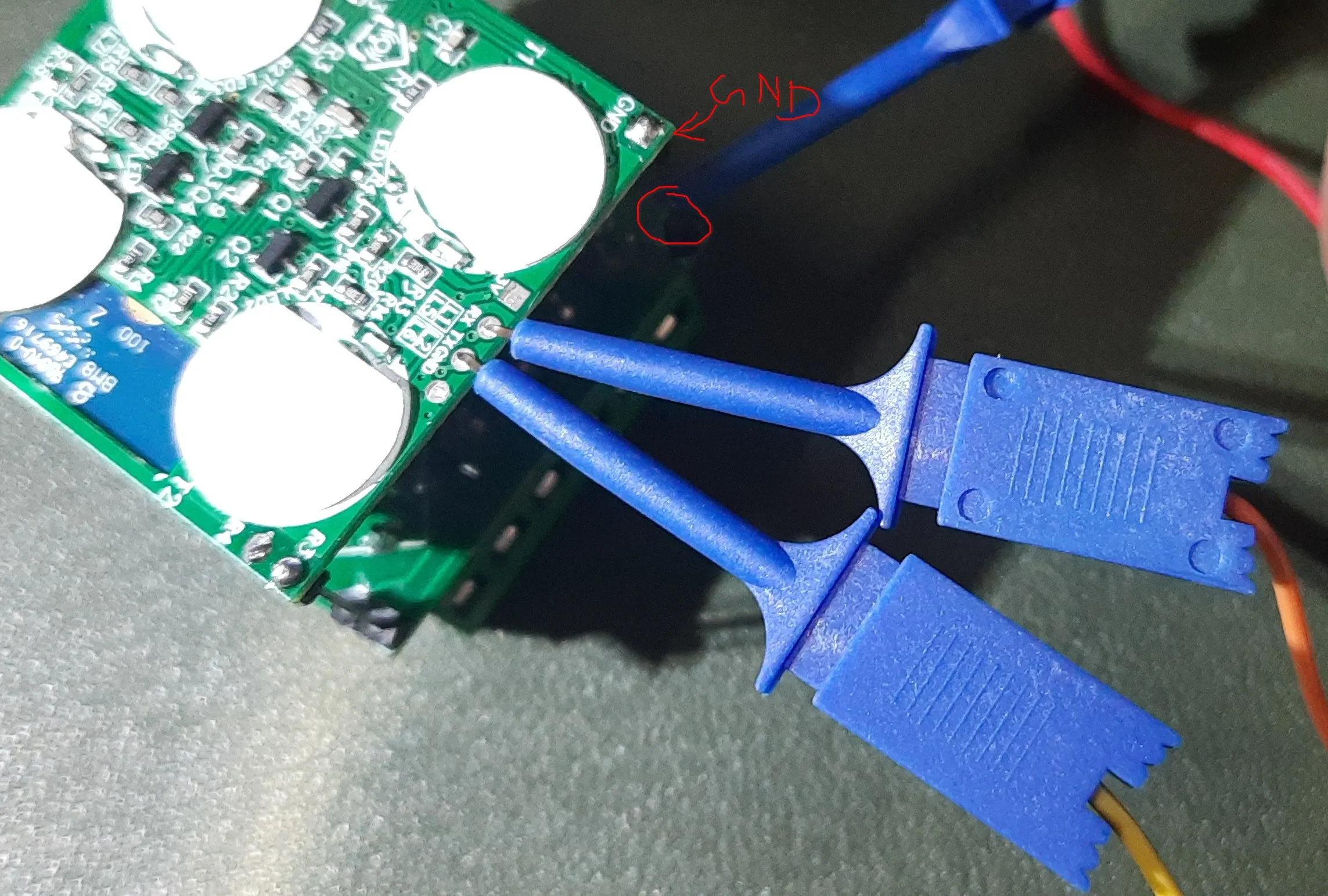
The serial pads are located on the back of the PCB. with easy access to the pads.
-
Connect RX and TX correctly (RX to TX, TX to RX) to the serial adapter. I did not solder wires directly to the pads, instead I used tiny clip test leads to make contact with the pads as seen in the image above.
-
There is a 5v line on the PCB clearly marked (A long pin header connecting multiple PCBs). Use a 5V serial adapter to power the device during flashing as a stable power source is required for successful flashing and using 3.3V may lead to instability as reported by some users.
-
Connect GND to GND, I did not use pads here since a pin header was available on the PCB.
-
Start flashing software on your computer. I used
ltchiptoolwith the following command:Terminal window ltchiptool flash write -d /dev/ttyUSB0 HomeMate-4-Gang-Touch-Switch-bk7231n.uf2 -
Put the device into flashing mode by shorting the CEN pin (on the chip itself) to GND once your tool says so. You will hear a relay click when it enters flashing mode. To short CEN to GND, I used a male jumper wire to touch the CEN pad and GND pad simultaneously. Refer to the image on lbretiny’s docs to locate the CEN pin.
ESPHome Configuration
You can use the following ESPHome configuration for the HomeMate 4 Gang Touch Switch. This configuration includes support for controlling the relays, touch buttons, status LEDs, and a power-on state selection.
Compile and flash the uf2 file as per the instructions above.
bk72xx:  board: cb3s

substitutions:  name: hm-4node-touch  friendly_name: HomeMate 4 Node Touch
preferences:  flash_write_interval: 5min
esphome:  name: ${name}  friendly_name: ${friendly_name}  # This logic runs once every time the device starts up.  on_boot:    priority: -10.0 # Ensures this runs after switch components are initialized.    then:      # --- Part 1: Apply the Power-On State ---      - if:          condition:            lambda: 'return id(power_on_select).state == "Off";'          then:            - logger.log: "Power-On State is 'Off'. Turning all relays off."            - switch.turn_off: relay_1            - switch.turn_off: relay_2            - switch.turn_off: relay_3            - switch.turn_off: relay_4          else:            - if:                condition:                  lambda: 'return id(power_on_select).state == "On";'                then:                  - logger.log: "Power-On State is 'On'. Turning all relays on."                  - switch.turn_on: relay_1                  - switch.turn_on: relay_2                  - switch.turn_on: relay_3                  - switch.turn_on: relay_4                else:                  - logger.log: "Power-On State is 'Restore'. Restoring from memory."
      # --- Part 2: NEW - Apply the correct Status LED state for any relays that are OFF ---      - logger.log: "Applying initial status LED state for any off relays."      - if:          condition: { switch.is_off: relay_1 }          then:            - if:                condition: { lambda: 'return id(status_led_when_off);' }                then: { lambda: 'pinMode(14, OUTPUT); digitalWrite(14, LOW);' } # White LED ON                else: { lambda: 'pinMode(14, INPUT);' }                         # White LED OFF      - if:          condition: { switch.is_off: relay_2 }          then:            - if:                condition: { lambda: 'return id(status_led_when_off);' }                then: { lambda: 'pinMode(9, OUTPUT); digitalWrite(9, LOW);' }                else: { lambda: 'pinMode(9, INPUT);' }      - if:          condition: { switch.is_off: relay_3 }          then:            - if:                condition: { lambda: 'return id(status_led_when_off);' }                then: { lambda: 'pinMode(8, OUTPUT); digitalWrite(8, LOW);' }                else: { lambda: 'pinMode(8, INPUT);' }      - if:          condition: { switch.is_off: relay_4 }          then:            - if:                condition: { lambda: 'return id(status_led_when_off);' }                then: { lambda: 'pinMode(7, OUTPUT); digitalWrite(7, LOW);' }                else: { lambda: 'pinMode(7, INPUT);' }logger:api:ota:wifi:  ssid: !secret wifi_ssid  password: !secret wifi_password
  # Enable fallback hotspot (captive portal) in case wifi connection fails  ap:    ssid: "esp ${name}"    password: !secret ap_password
captive_portal:
web_server:
globals:  - id: status_led_when_off    type: bool    restore_value: yes    initial_value: 'true'
status_led:  pin: GPIO06

select:  - platform: template    name: "${friendly_name} Power-On State"    id: power_on_select    icon: "mdi:power-settings"    options: ["Restore", "Off", "On"]    restore_value: yes    optimistic: True    entity_category: "config"
# Touch Buttonsbinary_sensor:  - platform: gpio    pin: { number: GPIO26, mode: INPUT_PULLUP }    name: "${friendly_name} Button 1"    entity_category: "diagnostic"    on_release: { switch.toggle: relay_1 }    disabled_by_default: True  - platform: gpio    pin: { number: GPIO24, mode: INPUT_PULLUP }    name: "${friendly_name} Button 2"    entity_category: "diagnostic"    on_release: { switch.toggle: relay_2 }    disabled_by_default: True  - platform: gpio    pin: { number: GPIO20, mode: INPUT_PULLUP }    name: "${friendly_name} Button 3"    entity_category: "diagnostic"    on_release: { switch.toggle: relay_3 }    disabled_by_default: True  - platform: gpio    pin: { number: GPIO22, mode: INPUT_PULLUP }    name: "${friendly_name} Button 4"    entity_category: "diagnostic"    disabled_by_default: True    on_multi_click:      - timing:          - OFF for at least 1s        then:          - logger.log: "Button 4 long press: Toggling status LEDs."          - switch.toggle: status_led_control      - timing:          - OFF for at most 500ms        then:          - logger.log: "Button 4 short press: Toggling relay 4."          - switch.toggle: relay_4  - platform: status    name: "${friendly_name} Status"    entity_category: "diagnostic"
switch:  # This is the switch to control the backlight LEDs  - platform: template    name: "${friendly_name} Status LEDs When Off"    id: status_led_control    icon: "mdi:lightbulb-night"    lambda: 'return id(status_led_when_off);'    turn_on_action:      - globals.set: { id: status_led_when_off, value: 'true' }      - if:          condition: { switch.is_off: relay_1 }          then: { lambda: 'pinMode(14, OUTPUT); digitalWrite(14, LOW);' }      - if:          condition: { switch.is_off: relay_2 }          then: { lambda: 'pinMode(9, OUTPUT); digitalWrite(9, LOW);' }      - if:          condition: { switch.is_off: relay_3 }          then: { lambda: 'pinMode(8, OUTPUT); digitalWrite(8, LOW);' }      - if:          condition: { switch.is_off: relay_4 }          then: { lambda: 'pinMode(7, OUTPUT); digitalWrite(7, LOW);' }    turn_off_action:      - globals.set: { id: status_led_when_off, value: 'false' }      - if:          condition: { switch.is_off: relay_1 }          then: { lambda: 'pinMode(14, INPUT);' }      - if:          condition: { switch.is_off: relay_2 }          then: { lambda: 'pinMode(9, INPUT);' }      - if:          condition: { switch.is_off: relay_3 }          then: { lambda: 'pinMode(8, INPUT);' }      - if:          condition: { switch.is_off: relay_4 }          then: { lambda: 'pinMode(7, INPUT);' }
  # --- Relay 1 ---  - platform: template    name: "${friendly_name} Relay 1"    id: relay_1    optimistic: true    restore_mode: RESTORE_DEFAULT_OFF    turn_on_action:      - lambda: 'pinMode(14, OUTPUT); digitalWrite(14, HIGH);'    turn_off_action:      - if:          condition: { lambda: 'return id(status_led_when_off);' }          then: { lambda: 'pinMode(14, OUTPUT); digitalWrite(14, LOW);' }          else: { lambda: 'pinMode(14, INPUT);' }  - platform: template    name: "${friendly_name} Relay 2"    id: relay_2    optimistic: true    restore_mode: RESTORE_DEFAULT_OFF    turn_on_action:      - lambda: 'pinMode(9, OUTPUT); digitalWrite(9, HIGH);'    turn_off_action:      - if:          condition: { lambda: 'return id(status_led_when_off);' }          then: { lambda: 'pinMode(9, OUTPUT); digitalWrite(9, LOW);' }          else: { lambda: 'pinMode(9, INPUT);' }  - platform: template    name: "${friendly_name} Relay 3"    id: relay_3    optimistic: true    restore_mode: RESTORE_DEFAULT_OFF    turn_on_action:      - lambda: 'pinMode(8, OUTPUT); digitalWrite(8, HIGH);'    turn_off_action:      - if:          condition: { lambda: 'return id(status_led_when_off);' }          then: { lambda: 'pinMode(8, OUTPUT); digitalWrite(8, LOW);' }          else: { lambda: 'pinMode(8, INPUT);' }  - platform: template    name: "${friendly_name} Relay 4"    id: relay_4    optimistic: true    restore_mode: RESTORE_DEFAULT_OFF    turn_on_action:      - lambda: 'pinMode(7, OUTPUT); digitalWrite(7, HIGH);'    turn_off_action:      - if:          condition: { lambda: 'return id(status_led_when_off);' }          then: { lambda: 'pinMode(7, OUTPUT); digitalWrite(7, LOW);' }          else: { lambda: 'pinMode(7, INPUT);' }