
HomeMaster-OpenTherm-Gateway

Product description
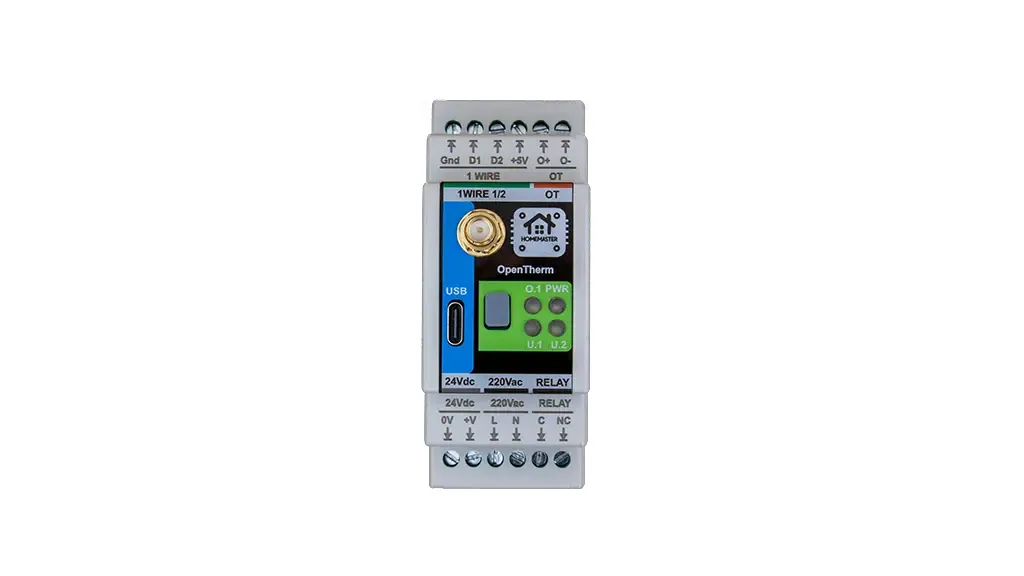
The HomeMaster OpenTherm Gateway is an open-source DIN-rail device based on the ESP32-WROOM-32U-N16 that interfaces with OpenTherm-compatible boilers. It provides a hardware OpenTherm interface together with one relay output and two 1-Wire temperature buses, and integrates directly with Home Assistant via the pre-installed ESPHome firmware.
Maker: home-master.eu
Product page: home-master.eu/shop/opentherm-gateway-59
Repository: GitHub — isystemsautomation/homemaster-dev/OpenthermGateway
Schematics: OpenthermGateway/Schematic
Datasheet: OpenTherm_Datasheet.pdf
Features
- ESP32-WROOM-32U-N16 microcontroller with Wi-Fi and Bluetooth (16 MB flash, external antenna)
- ESPHome compatible firmware for seamless Home Assistant integration
- Hardware OpenTherm interface (OT+ / OT-)
- 1 × SPDT dry-contact relay output (3 A @ 250 VAC system limit)
- 2 × 1-Wire buses (DS18B20 compatible)
- 1 front-panel button + status LED
- Power input options: 24 V DC, 85–265 V AC, or 120–370 V DC
- USB Type-C for programming, debugging and power
- Built-in web server for local control and diagnostics
- DIN-rail mountable (2 DIN modules)
Networking
Wi-Fi Connectivity – Integrated Wi-Fi for wireless access and Home Assistant integration.
Pinout
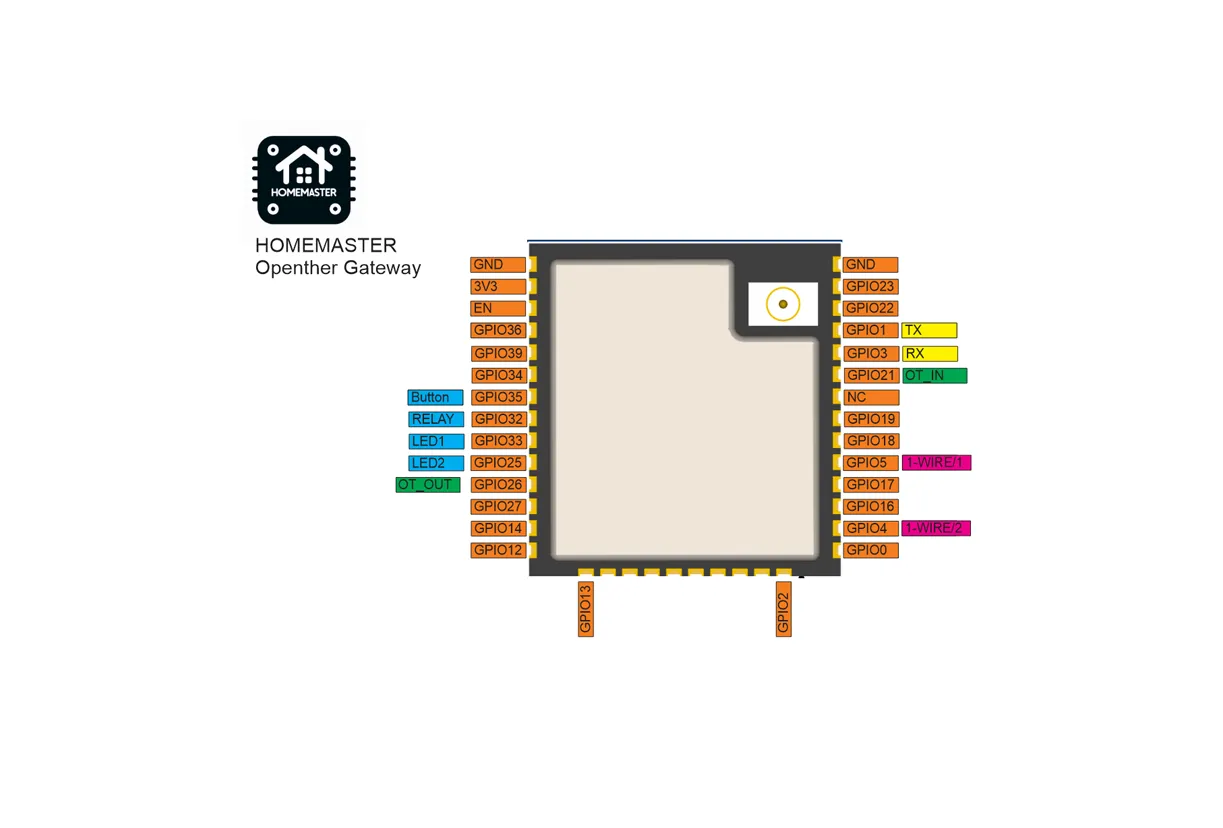
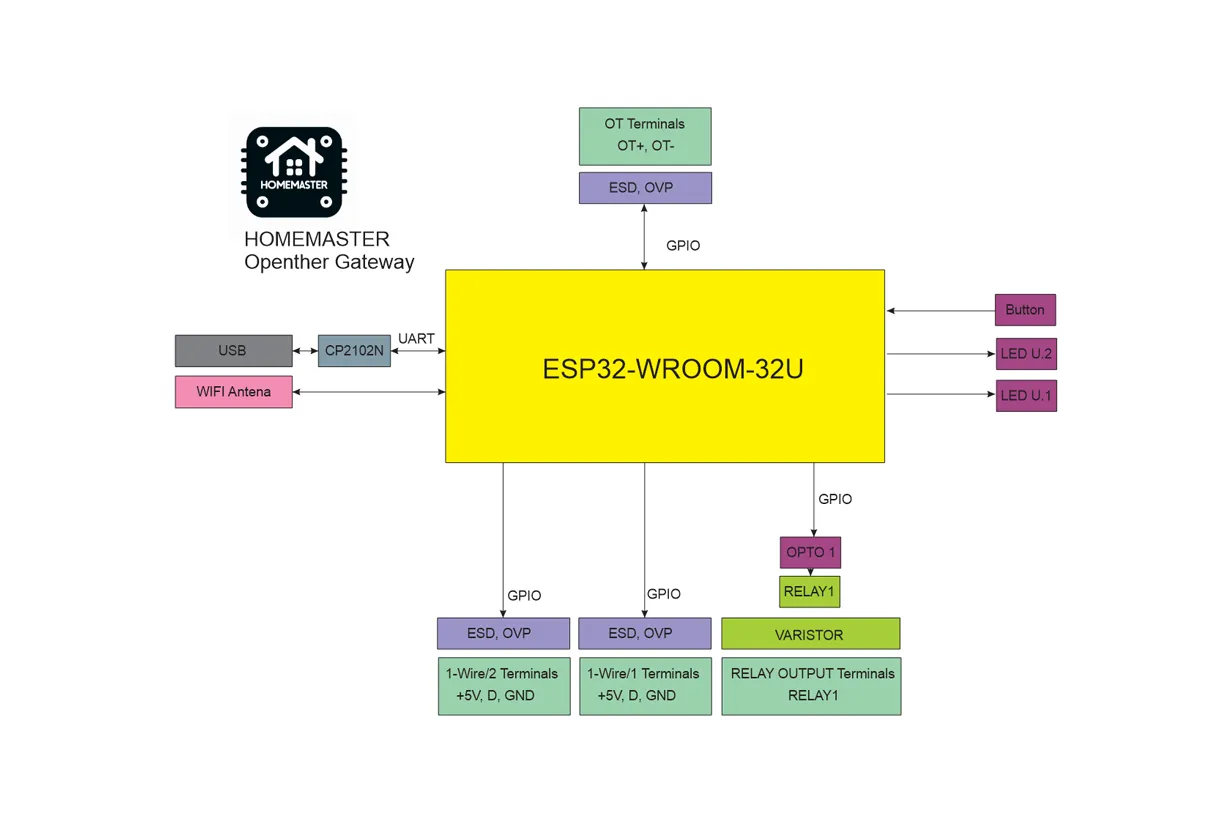
OpenTherm Gateway Functional Block Diagram
Programming
The OpenTherm Gateway comes with ESPHome pre-installed and can be configured via:
Improv
Wi-Fi Configuration with Improv
- Power on your HomeMaster OpenTherm Gateway.
- Go to improv-wifi.com (works in Chrome/Edge on desktop or mobile).
- Connect via USB (Serial) or Bluetooth LE.
- Enter your Wi-Fi SSID and password, then press Connect.
- The device joins your Wi-Fi and is now ready.
After provisioning, the device appears automatically in Home Assistant and
in the ESPHome Dashboard. Its hostname (with a MAC suffix to avoid
collisions, e.g. homemaster-opentherm-<mac>.local) is shown in the
ESPHome Dashboard — the built-in web UI is reachable at that address on
port 80.
One-Click Import (ESPHome Dashboard Import)
Once connected to Wi-Fi, the OpenTherm Gateway will be automatically discovered in ESPHome Dashboard.
When the device appears in ESPHome Dashboard, click “Take Control”.
The device supports dashboard import, automatically pulling its official configuration from GitHub.
USB Type-C: Use the ESPHome Dashboard to upload the configuration
- Connect the device to your computer with a USB Type-C cable.
- Download the YAML configuration file from our GitHub repository.
- Open the ESPHome Dashboard, import the YAML file, and update it with your Wi-Fi SSID and password.
- Flash the device directly from ESPHome Dashboard.
- The device supports automatic reset and boot control — there is no need to press reset or boot buttons during programming.
- After flashing, the device will reboot automatically and run the updated firmware.
GPIO map
| Signal | Function | GPIO |
|---|---|---|
| OT+ | OpenTherm output | GPIO26 |
| OT- | OpenTherm input | GPIO21 |
| D1 | 1-Wire Bus 1 | GPIO4 |
| D2 | 1-Wire Bus 2 | GPIO5 |
| Relay | SPDT dry-contact | GPIO32 |
| Button | Front-panel button | GPIO35 |
| Status | Status LED | GPIO33 |
Specifications
| Feature | Details |
|---|---|
| Microcontroller | ESP32-WROOM-32U-N16 (16 MB flash, external antenna) |
| Power Supply | 24 V DC, or 85–265 V AC, or 120–370 V DC (single input) |
| OpenTherm | Hardware interface (OT+ / OT-) |
| Relay Output | 1 × SPDT dry-contact (3 A @ 250 VAC, 90 W @ 30 VDC) |
| Temperature | 2 × 1-Wire (DS18B20 compatible) |
| Communication | Wi-Fi, Bluetooth, USB-C |
| Mounting | 35 mm DIN rail (2 modules) |
| Firmware | ESPHome (pre-installed) |
Example configuration
Hardware-only example showing the OpenTherm bus, relay, button, status LED and 1-Wire buses. Network plumbing
(api, ota, wifi, captive_portal, improv_*, dashboard_import, vendor HTTP OTA) is intentionally
omitted here per esphome-devices rules and is provided by the upstream shipped configuration linked below.
esphome:  name: homemaster-opentherm  friendly_name: Homemaster OpenTherm Gateway  name_add_mac_suffix: true  min_version: 2025.7.0  project:    name: homemaster.opentherm_gateway    version: "1.0.6"
esp32:  variant: esp32  board: esp32dev  flash_size: 16MB  framework:    type: esp-idf
logger:
wifi:  ap: {}
opentherm:  id: ot_bus  in_pin: GPIO21  out_pin: GPIO26
one_wire:  - platform: gpio    id: ow_bus_1    pin: GPIO4  - platform: gpio    id: ow_bus_2    pin: GPIO5
binary_sensor:  - platform: status    id: esp_status    name: "ESP Status"    entity_category: diagnostic
  - platform: gpio    id: button_1    name: "Button"    pin:      number: GPIO35      inverted: true      mode:        input: true
  - platform: opentherm    fault_indication:      id: ot_fault_indication      name: "Boiler Fault Indication"      entity_category: diagnostic    flame_on:      id: ot_flame_on      name: "Boiler Flame On"    ch_active:      id: ot_ch_active      name: "Boiler CH Active"    dhw_active:      id: ot_dhw_active      name: "Boiler DHW Active"    service_request:      id: ot_service_request      name: "Boiler Service Request"      entity_category: diagnostic    lockout_reset:      id: ot_lockout_reset      name: "Boiler Lockout Reset"      entity_category: diagnostic    low_water_pressure:      id: ot_low_water_pressure      name: "Boiler Low Water Pressure"      entity_category: diagnostic    flame_fault:      id: ot_flame_fault      name: "Boiler Flame Fault"      entity_category: diagnostic    air_pressure_fault:      id: ot_air_pressure_fault      name: "Boiler Air Pressure Fault"      entity_category: diagnostic    water_over_temp:      id: ot_water_over_temp      name: "Boiler Water Overtemperature"      entity_category: diagnostic    dhw_setpoint_transfer_enabled:      id: ot_dhw_setpoint_transfer_enabled      name: "Boiler DHW Setpoint Transfer Enabled"      entity_category: diagnostic    max_ch_setpoint_transfer_enabled:      id: ot_max_ch_setpoint_transfer_enabled      name: "Boiler Max CH Setpoint Transfer Enabled"      entity_category: diagnostic    dhw_setpoint_rw:      id: ot_dhw_setpoint_rw      name: "Boiler DHW Setpoint RW"      entity_category: diagnostic    max_ch_setpoint_rw:      id: ot_max_ch_setpoint_rw      name: "Boiler Max CH Setpoint RW"      entity_category: diagnostic    diagnostic_indication:      id: ot_diagnostic_indication      name: "Boiler Diagnostic Indication"      entity_category: diagnostic      disabled_by_default: true
sensor:  - platform: uptime    id: esp_uptime    name: "Uptime"    update_interval: 60s    entity_category: diagnostic  - platform: wifi_signal    id: wifi_signal_db    name: "WiFi Signal"    update_interval: 60s    entity_category: diagnostic  - platform: internal_temperature    id: esp32_temperature    name: "ESP32 Temperature"    update_interval: 60s    entity_category: diagnostic
  - platform: opentherm    t_boiler:      id: ot_t_boiler      name: "Boiler Water Temperature"      unit_of_measurement: "°C"    rel_mod_level:      id: ot_rel_mod_level      name: "Boiler Relative Modulation Level"      unit_of_measurement: "%"    t_ret:      id: ot_t_ret      name: "Boiler Return Temperature"      unit_of_measurement: "°C"      disabled_by_default: true    t_dhw:      id: ot_t_dhw      name: "Boiler DHW Temperature"      unit_of_measurement: "°C"      disabled_by_default: true    t_outside:      id: ot_t_outside      name: "Boiler Outside Temperature"      unit_of_measurement: "°C"      disabled_by_default: true    ch_pressure:      id: ot_ch_pressure      name: "Boiler CH Pressure"      unit_of_measurement: "bar"      disabled_by_default: true    dhw_flow_rate:      id: ot_dhw_flow_rate      name: "Boiler DHW Flow Rate"      unit_of_measurement: "l/min"      disabled_by_default: true    t_storage:      id: ot_t_storage      name: "Boiler Storage Temperature"      unit_of_measurement: "°C"      disabled_by_default: true    t_collector:      id: ot_t_collector      name: "Boiler Collector Temperature"      unit_of_measurement: "°C"      disabled_by_default: true    t_flow_ch2:      id: ot_t_flow_ch2      name: "Boiler CH2 Flow Temperature"      unit_of_measurement: "°C"      disabled_by_default: true    t_dhw2:      id: ot_t_dhw2      name: "Boiler DHW2 Temperature"      unit_of_measurement: "°C"      disabled_by_default: true    t_exhaust:      id: ot_t_exhaust      name: "Boiler Exhaust Temperature"      unit_of_measurement: "°C"      disabled_by_default: true
  - platform: dallas_temp    id: ow_bus_1_temperature    one_wire_id: ow_bus_1    name: "1-Wire Bus 1 Temperature"    unit_of_measurement: "°C"  - platform: dallas_temp    id: ow_bus_2_temperature    one_wire_id: ow_bus_2    name: "1-Wire Bus 2 Temperature"    unit_of_measurement: "°C"
switch:  - platform: opentherm    ch_enable:      id: ot_ch_enable      name: "Boiler CH Enable"      restore_mode: RESTORE_DEFAULT_ON    dhw_enable:      id: ot_dhw_enable      name: "Boiler DHW Enable"      restore_mode: RESTORE_DEFAULT_ON    cooling_enable:      id: ot_cooling_enable      name: "Boiler Cooling Enable"      disabled_by_default: true    otc_active:      id: ot_otc_active      name: "Boiler OTC Active"      disabled_by_default: true    ch2_active:      id: ot_ch2_active      name: "Boiler CH2 Active"      disabled_by_default: true    summer_mode_active:      id: ot_summer_mode_active      name: "Boiler Summer Mode Active"      disabled_by_default: true    dhw_block:      id: ot_dhw_block      name: "Boiler DHW Block"      disabled_by_default: true
  - platform: gpio    id: relay_1    name: "Relay"    pin: GPIO32
number:  - platform: opentherm    t_set:      id: ot_t_set      name: "Boiler CH Setpoint"      min_value: 20      max_value: 80      step: 1    t_dhw_set:      id: ot_t_dhw_set      name: "Boiler DHW Setpoint"      min_value: 35      max_value: 65      step: 1    max_t_set:      id: ot_max_t_set      name: "Boiler Max CH Setpoint"      min_value: 30      max_value: 85      step: 1      disabled_by_default: true    max_rel_mod_level:      id: ot_max_rel_mod_level      name: "Boiler Max Relative Modulation Level"      min_value: 0      max_value: 100      step: 1      disabled_by_default: true    otc_hc_ratio:      id: ot_otc_hc_ratio      name: "Boiler OTC Heat Curve Ratio"      min_value: 0      max_value: 127      step: 1      disabled_by_default: true
text_sensor:  - platform: version    id: esphome_version    name: "ESPHome Version"    entity_category: diagnostic  - platform: wifi_info    ip_address:      id: wifi_ip_address      name: "IP Address"      entity_category: diagnostic
status_led:  id: st_led  pin:    number: GPIO33    inverted: true
Full shipped firmware (factory)
The current firmware configuration is fetched live from the upstream repository:
# Loading https://github.com/isystemsautomation/homemaster-dev/blob/main/OpenthermGateway/Firmware/opentherm.yaml…