
GeekMagic SmallTV / SmallTV Ultra
Product Description
The GeekMagic SmallTV / SmallTV Ultra is a LCD display designed to look like a mini computer.
It is USB-C powered and has an ESP-12F/ESP8266 inside.
The LCD panel has a 28x28mm size resulting in a 240x240 pixel resolution.
Available on AliExpress at various vendors. The “SmallTV” and “SmallTV Ultra” models differ only in their firmware; the hardware is identical.
Product Images
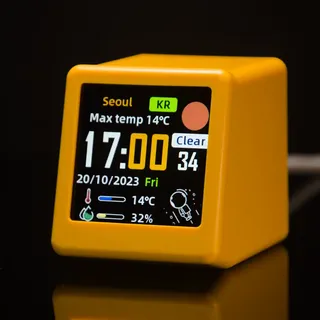
Flash ESPHome
Flashing the device can be done in 2 different ways.
1. Upload .bin file (using original firmware)(easiest)
The original firmware comes with the option to upload a custom .bin file. This can be done by connecting to the device’s access point over Wi-Fi. Open a browser and navigate to the IP address displayed on the screen of the device. Find the “Firmware update” section in the web interface and upload your .bin file. The .bin file can be generated with ESPHome Device Builder using the correct config below.
2. Manual flashing via Serial (Disassembly needed)
If the first option is not usable for you, you can always flash the device manually by disassembling it first. Unscrew the 2 screws at the bottom of the device and slide the plastic casing open from the back of the device. Because this device doesn’t have a USB to serial chip, we need to connect some wires to it in order to flash it.
Pinout:
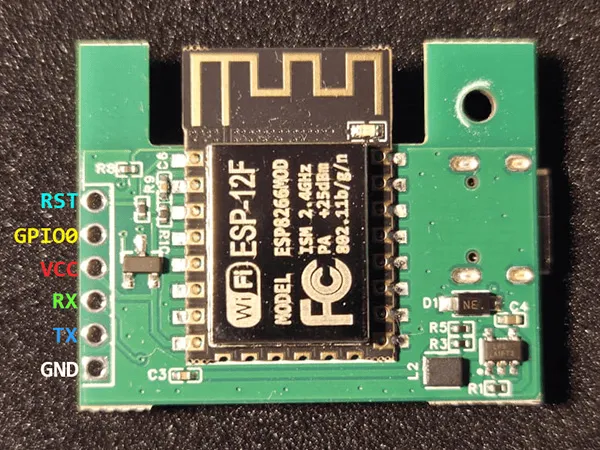
Note: To enter flash mode, GPIO0 must be pulled to GND during power-up.
Basic Configuration
NOTE: LVGL is not supported on this model due to the small memory size of the board, but it is supported on the GeekMagic Pro model (with ESP32 inside). As of now, displaying content on the screen is limited to the use of custom lambdas.
esphome:  name: geek-magic-ultra  friendly_name: geek-magic-ultra
esp8266:  board: esp12e
spi:  clk_pin: GPIO14  mosi_pin: GPIO13  interface: hardware  id: spihwd
output:  - platform: esp8266_pwm    pin: GPIO05    frequency: 1000 Hz    id: pwm_output    inverted: true
light:  - platform: monochromatic    output: pwm_output    id: backlight    name: "Backlight"    default_transition_length: 1s    restore_mode: ALWAYS_ON
font:  - file: "gfonts://Roboto"    id: roboto    size: 28
color:  - id: color_black    red_int: 0    green_int: 0    blue_int: 0    white_int: 0
  - id: color_white    red_int: 255    green_int: 255    blue_int: 255    white_int: 0
display:  - id: disp    platform: mipi_spi    model: ST7789V    spi_id: spihwd    dimensions:      height: 240      width: 240      offset_height: 0      offset_width: 0    dc_pin: GPIO00    reset_pin: GPIO02    buffer_size: 12.5%    invert_colors: true    color_depth: 16    color_order: BGR    spi_mode: mode3    data_rate: 40000000    rotation: 0°    auto_clear_enabled: false    update_interval: 1s    lambda: |-      it.fill(color_black);      it.printf(0, 0, id(roboto), color_white, "Hello World!");