
EZAIOT/XYZOO Thermostat (Tuya MCU)
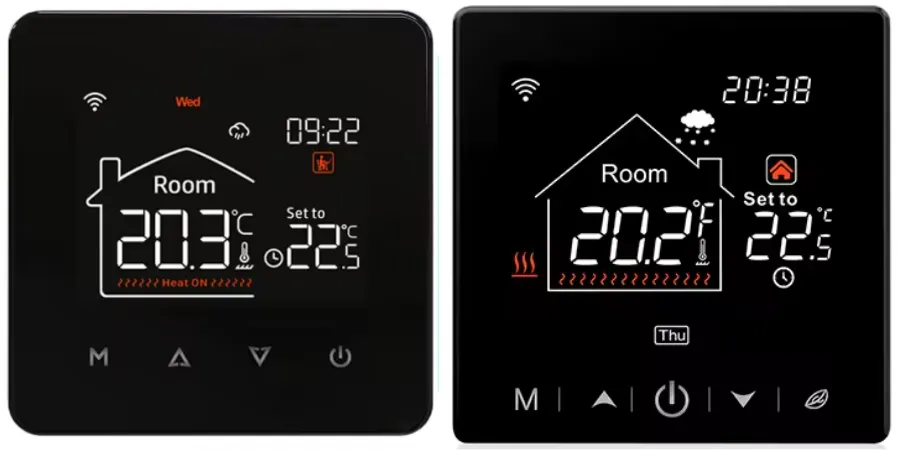
Maker: The two brands indicated and any possible similar clone with product ID dq6nlukkifyawj9n and version 1.15.0
Available on Aliexpress with many namings, but there is absolutely no guarantee.
Installation
NOTE: Before flashing always make a backup of the original firmware.
These units generally ship with a firmware which is no longer exploitable by tuya-fwcutter. Some disassembly is required for serial flashing; however, no soldering is needed as the board features through-holes that accept Dupont pins directly.
To begin, open the unit following the mounting instructions provided with the device. Once opened, you will find the PCB with labeled headers for the Beken BK7231N SoC. serial connection:
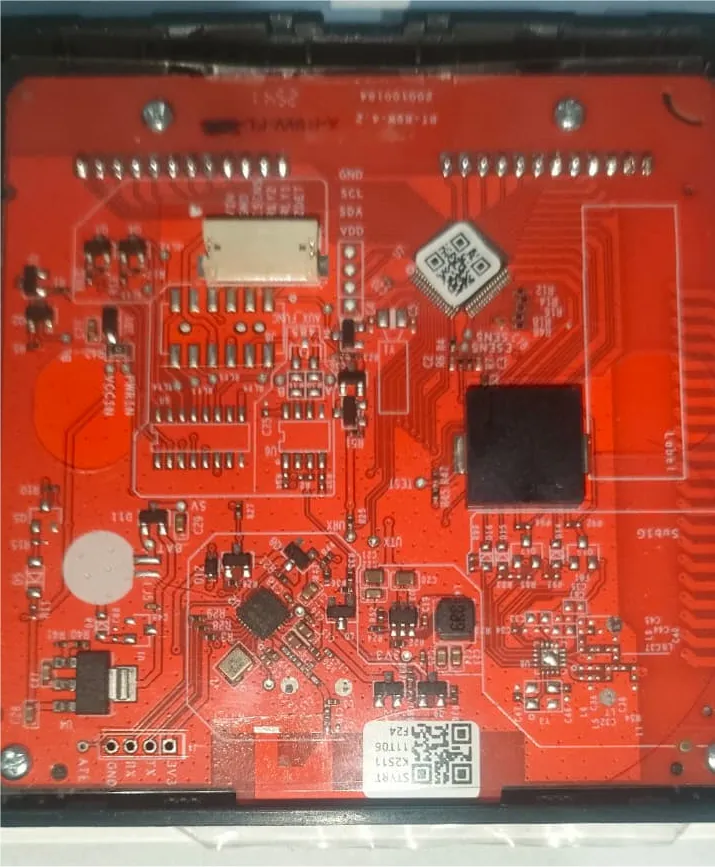
All necessary pins are clearly labeled:
- GND, RX, TX, 3V3.
NOTE: Connection is usually straight (TX to TX, RX to RX) depending on the board. If you cannot read or write the firmware, try swapping the RX/TX lines.
Do not attempt to flash the device while it is connected to mains power!
When ltchiptool says Getting bus... (now, please do reboot by CEN or by power off/on) disconnect and reconnect the GND
line, and it should proceed.
Tuya Datapoints
| Datapoints | Function |
|---|---|
| 1 | Turns on or off Thermostat |
| 2 | Working Mode (enum) |
| 10 | Frost Protection (switch) |
| 16 | Target Temperature (number) |
| 19 | Max Temperature SET (sensor) |
| 24 | Current Temperature (sensor) |
| 26 | Min Temperature SET (sensor) |
| 30 | Weekly Program (custom) |
| 31 | Weekly Type Selection (enum) |
| 40 | Child Lock (switch) |
| 45 | Fault Detect (bitmap/binary) |
| 102 | Temperature STEP (sensor) |
| 106 | Backlight Settings (custom) |
| 109 | Temperature Calibration (number) |
| 110 | Active State (binary sensor) |
| 111 | Version Number (string) |
| 112 | Hysteresis (readonly sensor) |
| 115 | Sensor Minimum (readonly sensor) |
NOTE: custom datapoints and device must be handled with a special starting script and a repository already present. (also for weather services and backlight/weekly programming to work). SOME datapoints, like: hysteresis, min and max temperature are programmable with the screen, but this may vary depending on the producer of the unit.
Configuration
- Per-device configuration:
substitutions:  name: house-thermostat  friendly_name: House Thermostat
bk72xx:  board: generic-bk7231n-qfn32-tuya
esphome:  name: $name  friendly_name: $friendly_name  name_add_mac_suffix: false  on_boot:    priority: -200    then:      - delay: 500ms      - script.execute: tuya_kick_first #necessary for the device to start correctly
external_components:  - source: github://SaschaKP/tuya_thermostat    components: [tuyanew]    refresh: 0s
preferences:  flash_write_interval:    seconds: 60
# Enable logginglogger:  level: INFO  baud_rate: 0 #115200#  hardware_uart: UART1
globals:  - id: second_sent    type: bool    initial_value: 'false'    restore_value: false
interval:  - interval: 20min    then:      - if:          condition:            api.connected:          then:            - script.execute: push_weather
# Enable Home Assistant APIapi:  encryption:    key: !secret api  reboot_timeout: 30min  on_client_connected:    then:      - if:          condition:            - lambda: return id(second_sent) == false;          then:            - lambda: |-                id(second_sent) = true;            - script.execute: tuya_kick_second      - delay: 1s      - script.execute: push_weather
ota:  - platform: esphome    password: !secret ota
wifi:  ssid: !secret wifi_ssid  password: !secret wifi_password  reboot_timeout: 20min
mdns:
#restart buttonbutton:  - platform: restart    name: "Restart"    id: button_restart
uart:  - id: mcu_uart    tx_pin: 1    rx_pin: 0    baud_rate: 38400    parity: NONE    data_bits: 8    stop_bits: 1    rx_buffer_size: 2048#    debug:#      sequence:#        - lambda: UARTDebug::log_hex(direction, bytes, ':');
time:  - platform: homeassistant    id: ha_time
tuyanew:  id: tuya_id  uart_id: mcu_uart  # The MCU uses this for displaying the time in the display as well as for  # scheduled programmes one may have configured in their thermostat.  time_id: ha_time  on_weather_request:    then:      script.execute: push_weather
  on_datapoint_update:    - sensor_datapoint: 106 # BackLight (6A)      then:        - lambda: |-            if (x.len >= 8) {              uint16_t end = (x.value_raw[0] << 8) + x.value_raw[1]; // 2 byte = total minutes              uint16_t start = (x.value_raw[2] << 8) + x.value_raw[3]; // 2 byte = total minutes
              TimeEntityRestoreState current_time;              current_time.second = 0; //set this to a valid zero
              current_time.hour = (uint8_t)(end / 60);              current_time.minute = (uint8_t)(end % 60);              current_time.apply(id(bl_end_time));
              current_time.hour = (uint8_t)(start / 60);              current_time.minute = (uint8_t)(start % 60);              current_time.apply(id(bl_start_time));
              id(bl_level_input).publish_state(x.value_raw[6]);
              id(bl_auto_off_input).publish_state((x.value_raw[7] == 0x00) ? "OFF" : "ON");
              ESP_LOGD("tuya_bl", "backlight setting - End %02i:%02i - Start %02i:%02i - Stanby BL %i - AutoOFF %i", (uint8_t)(end / 60), end % 60, (uint8_t)(start / 60), start % 60, x.value_raw[6], x.value_raw[7]);            }
    - sensor_datapoint: 30 # Weekly Program (1E)      then:        - lambda: |-            if (x.len >= 32) {              datetime::TimeEntity* times[] = {id(p1_time), id(p2_time), id(p3_time), id(p4_time), id(p5_time), id(p6_time), id(p7_time), id(p8_time)};              number::Number* temps[] = {id(p1_temp), id(p2_temp), id(p3_temp), id(p4_temp), id(p5_temp), id(p6_temp), id(p7_temp), id(p8_temp)};              for (int i = 0; i < 32; i+=4) {                TimeEntityRestoreState current_time;                current_time.hour = x.value_raw[i];                current_time.minute = x.value_raw[i+1];                current_time.second = 0;                current_time.apply(times[i / 4]);
                temps[i / 4]->publish_state(((x.value_raw[i+2] << 8) + x.value_raw[i+3]) / 10.0f);
                #if ESPHOME_LOG_LEVEL >= ESPHOME_LOG_LEVEL_DEBUG                ESP_LOGD("tuya_week_prg", "P%i: %02i:%02i - %.1f °C", (i / 4) + 1, x.value_raw[i], x.value_raw[i+1], ((x.value_raw[i+2] << 8) + x.value_raw[i+3]) / 10.0f);                #endif              }            }
text_sensor:  - platform: homeassistant    id: ha_weather_state # Extracts weather from the forecast    entity_id: weather.forecast_casa # use your forecast entity ID in home assistant    internal: true    on_value:      then:        - script.execute: push_weather
sensor:  - platform: homeassistant    id: ha_weather_temp    entity_id: weather.forecast_casa # use your forecast entity ID in home assistant    attribute: temperature # Extracts the current temperature from the weather    internal: true
  - platform: homeassistant    id: ha_weather_humidity    entity_id: weather.forecast_casa # use your forecast entity ID in home assistant    attribute: humidity # Extracts humidity from the forecast    internal: true    on_value:      then:        - script.execute: push_weather
  - platform: tuyanew    id: isteresi_temp    name: Hysteresis    entity_category: diagnostic    unit_of_measurement: "°C"    sensor_datapoint: 112    accuracy_decimals: 1    icon: mdi:thermometer-check    filters:      - lambda: return x * 0.1f;
binary_sensor:  - platform: tuyanew    name: "Fault"    device_class: problem    sensor_datapoint: 45
climate:  - platform: tuyanew    name: "Thermostat"    switch_datapoint: 1    target_temperature_datapoint: 16    current_temperature_datapoint: 24    temperature_multiplier: 0.1    active_state:      datapoint: 110    visual:      min_temperature: 5 °C      max_temperature: 50 °C      temperature_step:        target_temperature: 0.5 °C        current_temperature: 0.1 °C
switch:  - platform: tuyanew    name: "Child Lock"    switch_datapoint: 40    icon: mdi:lock
  - platform: tuyanew    name: "Frost Protection"    switch_datapoint: 10    icon: mdi:snowflake-melt
number:  - platform: tuyanew    name: "Temperature Calibration"    number_datapoint: 109    min_value: -9.9    max_value: 9.9    step: 0.1    entity_category: config    unit_of_measurement: "°C"    icon: mdi:thermometer-lines    multiply: 10
  - platform: template    name: "BackLight MIN"    id: bl_level_input    min_value: 0    max_value: 100    step: 1    unit_of_measurement: "%"    mode: BOX    optimistic: true    entity_category: config    icon: mdi:brightness-percent    set_action:      then:        - lambda: |-            id(push_backlight_dynamic)->execute(id(bl_start_time).hour * 60 + id(bl_start_time).minute, id(bl_end_time).hour * 60 + id(bl_end_time).minute, x, (id(bl_auto_off_input).current_option() == "ON") ? 0x01 : 0x00);
  - { platform: template, icon: mdi:home-thermometer, name: "P1 Temp", id: p1_temp, mode: BOX, entity_category: config, unit_of_measurement: °C, min_value: 5, max_value: 50, step: 0.5, optimistic: true, set_action: {then: {script.execute: push_full_schedule}} }  - { platform: template, icon: mdi:home-thermometer, name: "P2 Temp", id: p2_temp, mode: BOX, entity_category: config, unit_of_measurement: °C, min_value: 5, max_value: 50, step: 0.5, optimistic: true, set_action: {then: {script.execute: push_full_schedule}} }  - { platform: template, icon: mdi:home-thermometer, name: "P3 Temp", id: p3_temp, mode: BOX, entity_category: config, unit_of_measurement: °C, min_value: 5, max_value: 50, step: 0.5, optimistic: true, set_action: {then: {script.execute: push_full_schedule}} }  - { platform: template, icon: mdi:home-thermometer, name: "P4 Temp", id: p4_temp, mode: BOX, entity_category: config, unit_of_measurement: °C, min_value: 5, max_value: 50, step: 0.5, optimistic: true, set_action: {then: {script.execute: push_full_schedule}} }  - { platform: template, icon: mdi:home-thermometer, name: "P5 Temp", id: p5_temp, mode: BOX, entity_category: config, unit_of_measurement: °C, min_value: 5, max_value: 50, step: 0.5, optimistic: true, set_action: {then: {script.execute: push_full_schedule}} }  - { platform: template, icon: mdi:home-thermometer, name: "P6 Temp", id: p6_temp, mode: BOX, entity_category: config, unit_of_measurement: °C, min_value: 5, max_value: 50, step: 0.5, optimistic: true, set_action: {then: {script.execute: push_full_schedule}} }  - { platform: template, icon: mdi:home-thermometer, name: "P7 WE Temp", id: p7_temp, mode: BOX, entity_category: config, unit_of_measurement: °C, min_value: 5, max_value: 50, step: 0.5, optimistic: true, set_action: {then: {script.execute: push_full_schedule}} }  - { platform: template, icon: mdi:home-thermometer, name: "P8 WE Temp", id: p8_temp, mode: BOX, entity_category: config, unit_of_measurement: °C, min_value: 5, max_value: 50, step: 0.5, optimistic: true, set_action: {then: {script.execute: push_full_schedule}} }
select:  - platform: tuyanew    name: "Work Mode"    enum_datapoint: 2    options:      0: "Schedule"      1: "Manual"  - platform: template    name: "BackLight Auto Off"    id: bl_auto_off_input    options: ["OFF", "ON"]    optimistic: true    entity_category: config    set_action:      then:        - lambda: |-            id(push_backlight_dynamic)->execute(id(bl_start_time).hour * 60 + id(bl_start_time).minute, id(bl_end_time).hour * 60 + id(bl_end_time).minute, (uint8_t)id(bl_level_input).state, (x == "ON") ? 0x01 : 0x00);
  - platform: tuyanew    name: "Weekly Type"    id: weekly_type_select    enum_datapoint: 31    entity_category: config    options:      0: "5+2"      1: "6+1"      2: "7"    icon: mdi:calendar-edit
datetime:  - platform: template    name: "BackLight OFF"    id: bl_end_time    type: time    optimistic: true    entity_category: config    set_action:      then:        - lambda: |-            id(push_backlight_dynamic)->execute(id(bl_start_time).hour * 60 + id(bl_start_time).minute, x.hour * 60 + x.minute, (uint8_t)id(bl_level_input).state, (id(bl_auto_off_input).current_option() == "ON") ? 0x01 : 0x00);
  - platform: template    name: "BackLight ON"    id: bl_start_time    type: time    optimistic: true    entity_category: config    set_action:      then:        - lambda: |-            id(push_backlight_dynamic)->execute(x.hour * 60 + x.minute, id(bl_end_time).hour * 60 + id(bl_end_time).minute, (uint8_t)id(bl_level_input).state, (id(bl_auto_off_input).current_option() == "ON") ? 0x01 : 0x00);
  - { platform: template, name: "P1 Wakeup", id: p1_time, entity_category: config, type: time, optimistic: true, set_action: {then: {script.execute: push_full_schedule}} }  - { platform: template, name: "P2 Outside", id: p2_time, entity_category: config, type: time, optimistic: true, set_action: {then: {script.execute: push_full_schedule}} }  - { platform: template, name: "P3 Pause", id: p3_time, entity_category: config, type: time, optimistic: true, set_action: {then: {script.execute: push_full_schedule}} }  - { platform: template, name: "P4 Inside", id: p4_time, entity_category: config, type: time, optimistic: true, set_action: {then: {script.execute: push_full_schedule}} }  - { platform: template, name: "P5 Evening", id: p5_time, entity_category: config, type: time, optimistic: true, set_action: {then: {script.execute: push_full_schedule}} }  - { platform: template, name: "P6 Night", id: p6_time, entity_category: config, type: time, optimistic: true, set_action: {then: {script.execute: push_full_schedule}} }  - { platform: template, name: "P7 WE Day", id: p7_time, entity_category: config, type: time, optimistic: true, set_action: {then: {script.execute: push_full_schedule}} }  - { platform: template, name: "P8 WE Night", id: p8_time, entity_category: config, type: time, optimistic: true, set_action: {then: {script.execute: push_full_schedule}} }
script:  - id: tuya_kick_first    then:      - delay: 150ms      # 1. Query product info      - uart.write:          id: mcu_uart          data: [0x55,0xAA,0x00,0x01,0x00,0x00,0x00]      - delay: 150ms      # Heartbeat (state 0)      - uart.write:          id: mcu_uart          data: [0x55,0xAA,0x00,0x03,0x00,0x01,0x00,0x03]      - delay: 150ms      - uart.write:          id: mcu_uart          data: [0x55,0xAA,0x00,0x03,0x00,0x01,0x00,0x03]      - delay: 150ms      # Heartbeat (state 2)      - uart.write:          id: mcu_uart          data: [0x55,0xAA,0x00,0x03,0x00,0x01,0x02,0x05]
  - id: tuya_kick_second    then:      # Heartbeat (state 3)      - uart.write:          id: mcu_uart          data: [0x55,0xAA,0x00,0x03,0x00,0x01,0x03,0x06]      - delay: 150ms      # Query all DP status      - uart.write:          id: mcu_uart          data: [0x55,0xAA,0x00,0x08,0x00,0x00,0x07]
  - id: push_weather    then:      - lambda: |-          bool data_valid = true;
          // Validity check of numeric and textual data          if (std::isnan(id(ha_weather_temp).state) ||              std::isnan(id(ha_weather_humidity).state) ||              id(ha_weather_state).state == "unavailable") {            data_valid = false;          }
          if (!data_valid) {            // No data available, skip            return;          }
          uint8_t icon_code = 2; // Default on CLOUD          std::string state = id(ha_weather_state).state;
          // 0: NO ICON (Clear Night)          if (state == "clear-night" || state == "unknown") {            icon_code = 0; // NO ICON IF AT NIGHT (CLEAR) OR UNKNOWN          }          else if (state == "sunny") {            icon_code = 1; // SUN          }          else if (state == "partlycloudy" || state == "windy" || state == "windy-variant") {            icon_code = 6; // SUN AND CLOUD          }          else if (state == "cloudy" || state == "fog" || state == "haze" || state == "dust" || state == "exceptional") {            icon_code = 2; // CLOUD          }          else if (state == "rainy" || state == "pouring" || state == "lightning" || state == "lightning-rainy") {            icon_code = 3; // RAIN          }          else if (state == "snowy-rainy" || state == "hail") {            icon_code = 5; // SNOW AND RAIN          }          else if (state == "snowy") {            icon_code = 4; // SNOW          }
          int16_t temp = (int)id(ha_weather_temp).state;          uint8_t hum = (int)id(ha_weather_humidity).state;
          id(tuya_id).send_weather_data(icon_code, temp, hum);
  - id: push_backlight_dynamic    parameters:      start_mins: uint16_t      end_mins: uint16_t      lux: uint8_t      aoff: uint8_t    mode: restart    then:      - delay: 500ms #avoid multiple sending if user changes a value within a delay of time      - lambda: |-          std::vector<uint8_t> data;          data.reserve(8);          data.push_back((uint8_t)(end_mins >> 8));          data.push_back((uint8_t)(end_mins & 0xFF));          data.push_back((uint8_t)(start_mins >> 8));          data.push_back((uint8_t)(start_mins & 0xFF));          data.push_back(0x00); //Reserved          data.push_back(0x00); //Reserved          data.push_back(lux);          data.push_back(aoff);
          id(tuya_id).set_raw_datapoint_value(106, data);          ESP_LOGD("backlight", "Sync MCU: End %02d:%02d, Start %02d:%02d, Lux %d, AutoOff %d",                    id(bl_end_time).hour, id(bl_end_time).minute,                    id(bl_start_time).hour, id(bl_start_time).minute,                    lux, aoff);
  - id: push_full_schedule    mode: restart    then:      - delay: 500ms #avoid multiple sending if user changes a value within a delay of time      - lambda: |-          datetime::TimeEntity* times[] = {id(p1_time), id(p2_time), id(p3_time), id(p4_time), id(p5_time), id(p6_time), id(p7_time), id(p8_time)};          number::Number* temps[] = {id(p1_temp), id(p2_temp), id(p3_temp), id(p4_temp), id(p5_temp), id(p6_temp), id(p7_temp), id(p8_temp)};          // Total Buffer: 55 AA 00 06 (Header/Ver/Cmd) + 00 24 (Len) + 1E 00 00 20 (DP Header) + 32 byte data + Checksum          std::vector<uint8_t> data;          data.reserve(32);
for (uint8_t i = 0; i < 8; ++i) { data.push_back((uint8_t)times[i]->hour); data.push_back((uint8_t)times[i]->minute); float s = temps[i]->state; uint16_t temp = std::isnan(s) ? 200 : (uint16_t)(s * 10); data.push_back((uint8_t)(temp >> 8)); data.push_back((uint8_t)(temp & 0xFF)); } id(tuya_id).set_raw_datapoint_value(30, data); ESP_LOGD("tuya_schedule", "Complete programming sent (32 byte payload)");NOTE: this particular configuration mimics tuya protocol exactly as seen on logs on version 1.15.0 (DP 111)